
Clik Elec Cert1.2 - Get APK
You'll be able to download in few seconds.
Publisher Description
The app that allows you to complete electrical safety certificates on the move.
Android App For NICEIC Certificate
Clik Elec Cert is the fast and easy Android app that allows you to create NICEIC certificates on the move.
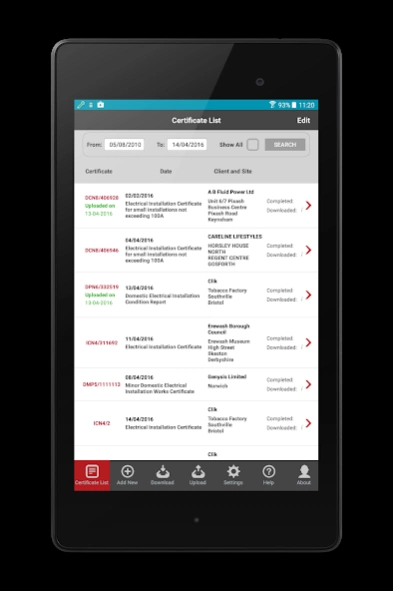
The brand new app works alongside the desktop NICEIC Certification Software. The android app for NICEIC certificate allows you to quickly edit electrical certs on your tablet.
It’s the place to sort all your NICEIC certificates which can fit in your pocket so you can take work with you wherever you go.
Get personalised professional looking certs at your fingertips with Clik Elec Cert, the NICEIC Certification app for Android.
Features:
• Buy e-certs direct from NICEIC which are 68% cheaper* than pads and 45% cheaper* than the cloud software.
• App syncs with NICEIC Certification Software for desktop
• Link certs with customer accounts.
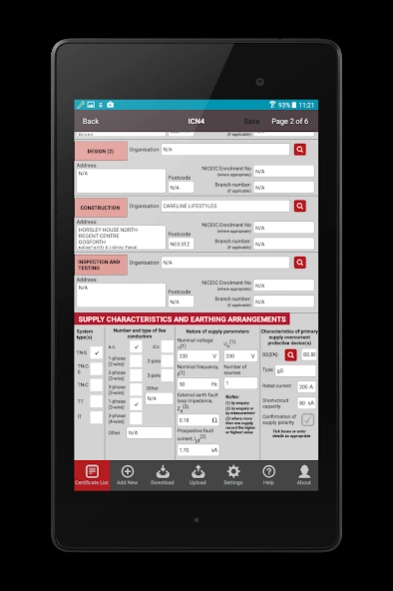
• Built-in database for protective devices.
• Circuit details wizard.
Benefits:
• Save money by using e-certs.
• Cut down on paperwork and time spent completing certificates.
• No wastage with void certificates.
• Get professional certs every time.
Certificates available now:
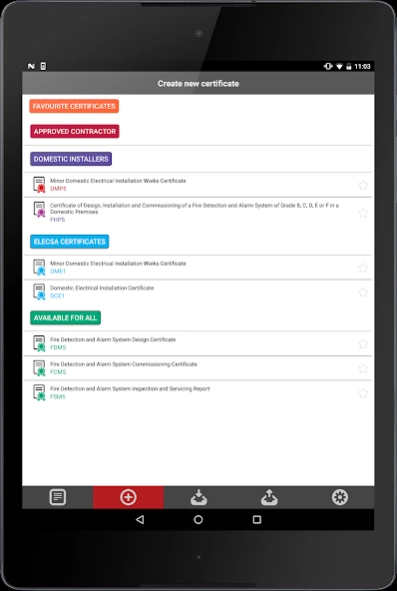
Domestic Installer
• DMP5 - Minor Domestic Electrical Installation Works Certificate
• FHP5 - Certificate of Design, Installation and Commissioning of a Fire Detection and Alarm System of Grade B, C, D, E or F in a Domestic Premises
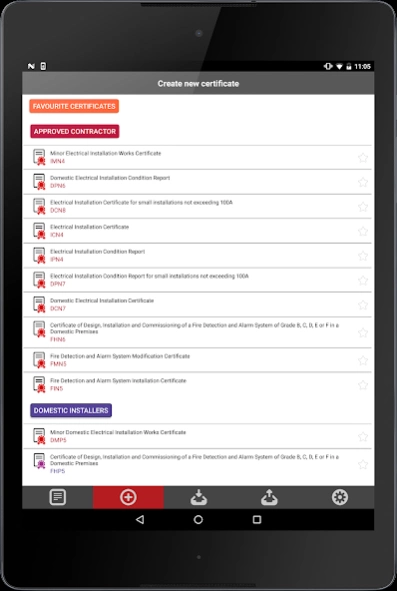
Approved Contractor
• DCN8 - Domestic Electrical Installation Certificate for small installations not exceeding 100A
• DPN6 - Domestic Electrical Installation Condition Report
• ICN4 - Electrical Installation Certificate
• IMN4 – Minor Electrical Installation Works Certificate
• DCN7 – Domestic Electrical Installation Certificate
• FHN6 – Certificate of Design, Installation and Commissioning of a Fire Detection and Alarm System of Grade B, C, D, E or F in a Domestic Premises
• FMN5 - Fire Detection and Alarm System Modification Certificate
• FIN5 – Fire Detection and Alarm System Installation Certificates
Elecsa
• DCE1 - Domestic Electrical Installation Certificate
• DME1 - Minor Domestic Electrical Installation Works Certificate
Available to all
• FDM5 - Fire Detection and Alarm System Design Certificate
• FCM5 - Fire Detection and Alarm System Commissioning Certificate
• FSM6 - Fire Detection and Alarm System Inspection and Servicing Report
Cut down on paperwork, so you can focus on what you do best: the real work.
To appreciate all the Clik Elec Cert Android app has to offer ensure that you are running the latest version of the desktop NICEIC Certification Software. You can check which version you are currently using by clicking ‘Help > About’ from within the desktop software.
To link up your app and desktop software don't forget to synchronize your desktop data!
Certs Available And Certs Coming Soon
http://support.cliksoftware.com/customer/en/portal/articles/2452217-certificates-available-on-the-clik-elec-cert-android-app
*Figures based on EICR’s.
About Clik Elec Cert
The company that develops Clik Elec Cert is Clik. The latest version released by its developer is 1.2.
To install Clik Elec Cert on your Android device, just click the green Continue To App button above to start the installation process. The app is listed on our website since 2018-04-12 and was downloaded 0 times. We have already checked if the download link is safe, however for your own protection we recommend that you scan the downloaded app with your antivirus. Your antivirus may detect the Clik Elec Cert as malware as malware if the download link to com.clikeleccert is broken.
How to install Clik Elec Cert on your Android device:
- Click on the Continue To App button on our website. This will redirect you to Google Play.
- Once the Clik Elec Cert is shown in the Google Play listing of your Android device, you can start its download and installation. Tap on the Install button located below the search bar and to the right of the app icon.
- A pop-up window with the permissions required by Clik Elec Cert will be shown. Click on Accept to continue the process.
- Clik Elec Cert will be downloaded onto your device, displaying a progress. Once the download completes, the installation will start and you'll get a notification after the installation is finished.
Program Details
System requirements
Download information
Pricing
Version History
version 1.2
posted on 2018-04-12
Bug fixes
version 1.2
posted on 2018-01-16
IMN4 bug fix
version 1.1
posted on 2016-08-03
New bits we have added in:,IPN4 – Electrical Installation Condition Report,DPN7 – Electrical Installation Condition Report for small installations not exceeding 100 A,Favourites section – within add new you can now star your most used certificates so they display at the top,Things we’ve tweaked/bug fixes:,DPN6 – “Date(s) on which inspection and testing were carried out” was not allowing you to select a date,Help section now directs you to the correct Android App help page from our website
Disclaimer
External Download
We do not host Clik Elec Cert on our servers. We did not scan it for viruses, adware, spyware or other type of malware. This app is hosted by Galad and passed their terms and conditions to be listed there. We recommend caution when installing it.
The APK Download link for Clik Elec Cert is provided to you by apps112.com without any warranties, representations or guarantees of any kind, so access it at your own risk.
If you have questions regarding this particular app contact the publisher directly. For questions about the functionalities of apps112.com contact us.
